
CHANNELS

infoTECH Feature
Display Technology Review: Philips' E-Line IPS Monitor Sound, But with Minor Issues
 By
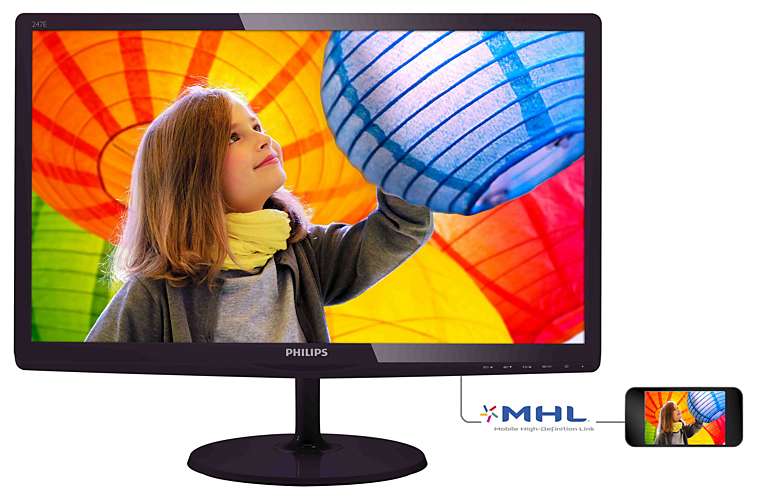
By Philips (News - Alert) is widely known for its audio and visual equipment, from televisions to projectors to home theater gear. But its line of monitors is somewhat less well-known. That's a point that should be addressed in short order, and one that will be: our friends out at Philips sent over an E-Line IPS monitor for us to review, and it has a lot to like. But it's also going to have a couple sticking points to watch out for.
Testing
By virtue of the multiple connection points contained in the monitor, it was comparatively simple to test it with multiple devices. A VGA port on the rear allowed for an easy connection to a laptop, though there was a DVI port also on hand for those devices that include such ports. An HDMI port, meanwhile, was also on hand, and that made for a surprisingly easy connection to home theater gear, which I tried with an Xbox One.
Features
This being a computer monitor, features are somewhat on the limited side. It's got a 23.6 inch viewable display, and the controls are touch controls built into the underside of the bezel. A rear hinge built into the monitor stand allows for an adjustable view, and the monitor displays at 1920 x 1080 resolution at a 60 hertz refresh rate.
Performance
Trying several different video types with the E-Line IPS monitor proved to be a terrific exercise. It worked well with streaming video via a laptop, and turning to a DVD of Lionsgate's “Gamer”, DVD playback proved every bit the match for the Philips E-Line monitor. Meanwhile, hooking it up to an Xbox One worked out well as well, with the HDMI connection performing soundly and showing Netflix nicely, even without sound. Similar footage of “Minecraft” was also sound. The video from the HDMI connection did seem just a bit clearer, though given that it's a 60 hertz refresh rate, it can really only be so clear.
Controls
The Philips E-Line not only has great physical controls that respond very smoothly, but there are also some terrific menu controls included to adjust the picture as needed. Even the monitor stand itself has a degree of control, with an adjustable stand to pitch the monitor according to conditions. Everything works nicely, though the stand had some issues.
Pricing
The Philips 247E6QDSD, the full name of the monitor in question, retails at $229.99 according to information from Amazon, but Amazon's also offering it up for a fairly steep discount, at $159.99. That's not a bad price for a monitor, and it actually compares pretty well. There are some less expensive models around, but it's actually under several models as well. Calling this a mid-range monitor might be the best way to phrase it, though its performance is actually better than the name mid-range would suggest.
My Experience
I like the Philips E-Line IPS monitor for several reasons. After trying this with a laptop and DVD, it didn't take long to come to the conclusion that, for anyone looking to put a fairly complete home theater system in a very small space, the Philips E-Line will make a great alternative. When joined with a laptop, or desktop, and a speaker system like the Divoom speaker, the end result is a full and impressive home theater experience in a very small space. Nowhere near as great as some, of course, but for those who don't have a whole lot of room to work with, or very many plugs, this could do the job pretty well. It helps in that a 24 inch screen really should be viewed from a distance of about 38.4 inches away, or just over three feet. Some don't believe in the 1.6 rule of thumb—in which ideal viewing distance is found by multiplying the screen diagonal in inches by 1.6—but I find it works rather well.
The one thing I wasn't so happy about was the monitor base design. Putting it together was a snap, even with minimal instructions to help. But putting it together in isolation left the monitor oddly skewed downward, until I found that the monitor base had an adjustable angle setting. It's not very clearly marked, or even noted in any documentation that I could spot, so I literally had to force the issue by pulling on the monitor base until the angle functions engaged.
Conclusion
A little better documentation could have made the Philips E-line IPS monitor a nearly perfect system. But as it is, it offers a terrific total package and does so at a reasonable price. Those in the market for a new monitor—and let's face it, that desktop PC isn't going anywhere without one—will want to have a look at this little beauty.
Pros: excellent controls, plenty of custom tinkering options, terrific image display, good price
Cons: poor documentation
Edited by Dominick Sorrentino
|
|
FOLLOW US |  |
 |
 |
infoTECH Headlines
Exchange Server Recovery: Best Practices for Production Environment
Beyond the headlines: translating the Mythos risk for business leaders
cdmon Supports Online Businesses with Hosting, Domains and Digital Infrastructure Services
Why Hiring a Commercial Electrician in Keller Matters for Business Safety, Efficiency, and Growth
Are You Giving Your Agentic AI Too Much Access? Is it Impacting Compliance?
The Future of AI: Autonomous Training Models That Learn Continuously
How to Migrate from One Microsoft 365 Account to Another?
Simulating Your Worst-Case Scenario and Keeping Tabs on New Threats Using AI Systems
From Reactive to Proactive: Using AI to Hunt BEC in Real Time
Strengthening Tampa Businesses with Expert Cybersecurity Solutions
infoTECH Whitepapers